
PSA: Get To Know FaceTime's Cool Little Brother, FaceTime Audio
Everyone with an iPhone has used FaceTime to make a video call, but few people know much about FaceTime’s little brother, FaceTime Audio. While it doesn’t sound like anything special, it actually has some pretty significant benefits that you should take advantage of every time you can.
FaceTime Audio is essentially an alternative to the traditional phone call. It’s voice only, (no video) so a lot of people assume it’s no different than calling someone using their phone number, but that’s not true at all. FaceTime Audio has a couple big perks over traditional phone calls.
One benefit is that FaceTime Audio calls are made over the internet, rather than using the standard, old school technology that cell phone carriers use when you make a traditional call. Because they use VoIP (Voice over Internet Protocol), if you have a strong internet connection (whether via wifi or your carrier’s LTE towers), your calls will likely sound clearer than if you’d make a traditional call. It also means that you don’t need a cell phone plan to make a FaceTime Audio call if you have wifi.
Another big benefit is that nobody can listen in on calls you make using FaceTime Audio. When you make a standard phone call, your carrier and the government has tools that allows them to eavesdrop on your call (thanks to the Patriot Act). Fortunately for us, Apple decided to protect FaceTime Audio using end-to-end encryption, which means that there’s no way for someone who isn’t directly included on the call to decrypt its contents. When we say no one, we mean no one — not your carrier, not the government, not Anonymous, not even Apple. It’s as secure as it gets.
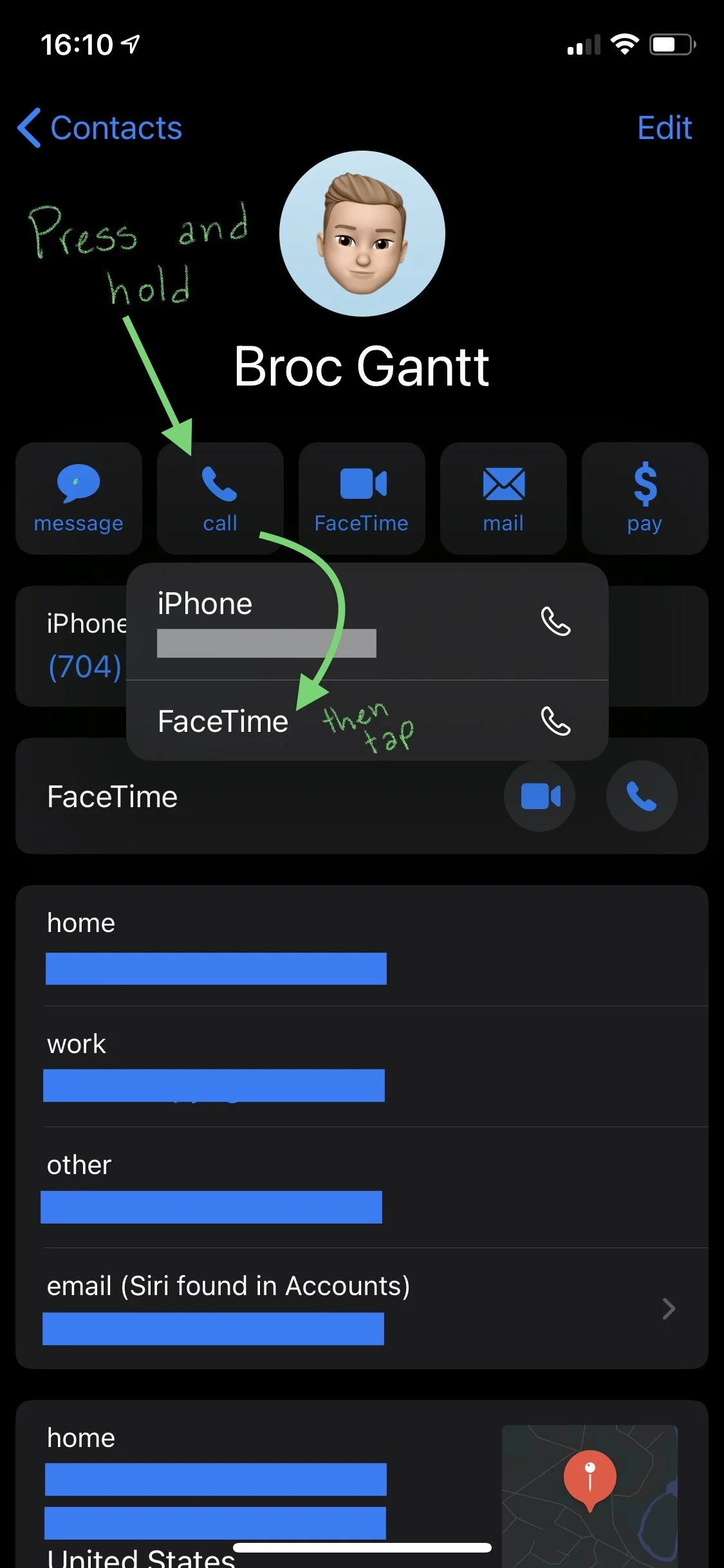
To make a phone call using FaceTime Audio, you have a few options. You can initiate the call by just asking Siri to “make a FaceTime Audio call to [person you want to call]”, or you can start it via either the Contacts, Phone, or Messages apps by tapping and holding on the phone button by a person’s name to see a list of call options, and then choosing “FaceTime Audio”. And that’s it. Pretty simple.
Voila! Go forth, and insist that all your friends use FaceTime Audio so as to never have to talk to you on an unprotected, fuzzy sounding, old school phone call ever again.