
iPhone 18 Pro
It’s been a hot minute since I’ve done a review of a new iPhone — I believe my last published review was for the iPhones 12 and 12 Pro — so I suppose I have a bit of catching up to do.
The iPhones 13 and 13 Pro
You still have one of these? Good lord, upgrade already.
The iPhones 14 and 14 Pro
See above.
Also, the Dynamic Island introduced on the Pro phones was a great addition to the operating system, even if it was a bit of a misdirect to keep your attention away from the fact that in order to eschew the notch, they had to go with a somewhat wide cutout in the display.
The iPhones 15 and 15 Pro
If you have an iPhone 15, see above. If you have an iPhone 15 Pro and you have any desire or impulse to upgrade, I say go for it (with carrier trade-in deals, you can almost certainly get an iPhone 18 Pro for free).
I liked that they switched to titanium for the metal body of the Pro series this year, it felt premium and was extremely tough. But, titanium doesn’t conduct heat very well, so these phones have a tendency to get fairly warm. Also, this is the year Apple decided to switch the charging port from the Lighting connector (used on every iPhone for the past 11 years at the time, introduced in 2012 with the iPhone 5) to USB-C, which has proven to be a nice upgrade since you can now use the same charger for your iPhone and your Mac, iPad, AirPods, and tons of third party devices.
The iPhones 16 and 16 Pro
It took me a minute to remember whether there was a cool addition to the iPhone was this year, and then it hit me. If you ask Apple, they’ll tout the camera control button that acts as a camera app launcher and shutter button, as well as a little touchpad to adjust photography settings on the fly without having to touch your iPhone’s display. If you were to ask me, I would tell you that the iPhone 16 lineup didn’t have an awesome new feature, because the camera control button sucks. It’s faster and far less fiddly to adjust whatever setting you need to adjust on the screen when taking a photo rather than try to do it with a one dimensional touch target that’s quite sensitive to different levels of pressure. That said, this generation of iPhones dutifully continue the march forward on things like performance and camera improvements. It’s also the first generation where every device released in this cycle, Pro and standard, support Apple Intelligence.
The iPhones 17 and 17 Pro
2025 was a great year for the iPhone. The iPhone 17 took several big steps forward this year over the previous year’s base model, and is probably the device for most people, even now. Some of the most noticeable upgrades include a much better selfie camera, improved battery life, a far more scratch resistant display, and double the storage in the base model. They also gave it the very useful always-on display and increased the refresh rate to 120hz, which is a subtle improvement but means that animations will look smoother. Finally, they made the black bezels around the screen thinner.
That said, the iPhone 17 Pro also got some great improvements this time around (including the aforementioned scratch resistance, improved front camera, improved battery life, and increased storage). They redesigned the body of the phone and switched to aluminum rather than titanium for the frame, and they finally made one in a fun color (cosmic orange). The switch to aluminum made a noticeable difference with thermals, and the addition of a vapor chamber also helped a lot; they basically solved the overheating issue that had been a problem on the prior few generations. I want to touch on the battery life improvements for this model specifically, because they really knocked it out of the park. I was noticing about 20% more battery life with the 17 Pro versus the 16 Pro. The last big thing for the 17 Pro is that all three cameras on the back now sport 48 megapixel sensors, yielding noticeably sharper images for zoomed-in shots (the telephoto lens was the last one to make the jump from 12MP to 48MP).
The iPhone Air
The iPhone Air is impressive to hold, it’s very light and incredibly thin. The one-camera situation is pretty bad, though. I also hear that thermal throttling (i.e. the processor slowing down because it gets too hot) is an issue. I like that Apple is prioritizing sleekness in the design, I just wish they had taken that impulse and applied it to the Pro line rather than creating a whole new device, because the Pros are getting increasingly thick and heavy every year.
The iPhone 18 Pro
This year’s iPhone 18 Pro is a solid upgrade over the 17 Pro in several ways, but they are admittedly incremental and the colors are a bit less exciting.
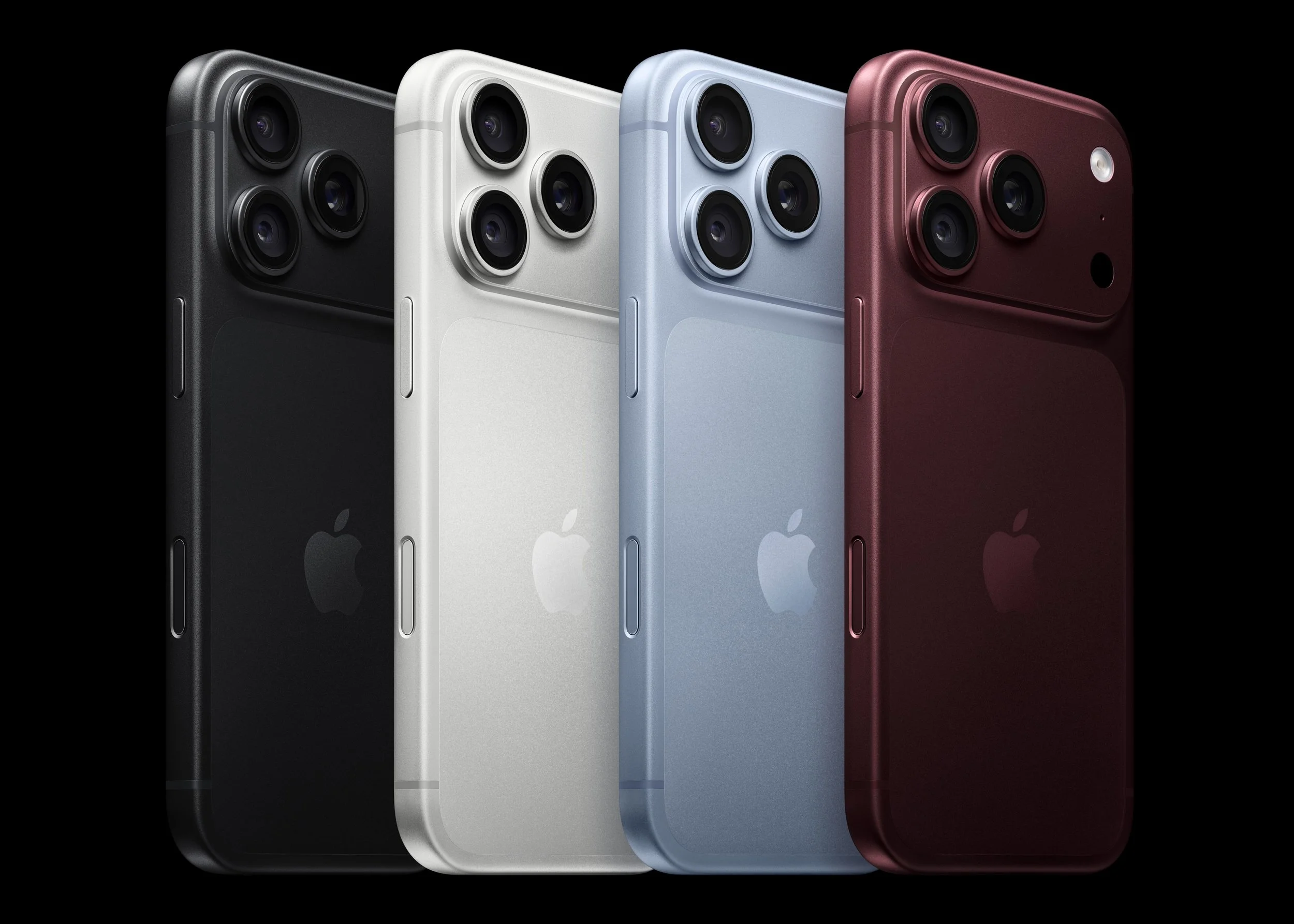
The headlining new feature is a variable aperture on the main camera lens. In practice, most customers aren’t going to know exactly what purpose this serves, but fortunately they don’t need to. The system will automatically narrow or widen the aperture to let in more or less light without the user needing to know how to work it. That said, at it’s narrower settings, it can produce a striking starburst effect around bright lights when shooting in dark environments. This is not a filter or artificially added effect — it’s a result of the light hitting the sensor after passing through the hexagonal opening created by the aperture blades.
They improved the battery life significantly, again. If the iPhone 17 Pro felt like an additional 20% of battery on top of what the 16 Pro offered, this feels like an additional 10-15% stacked on top of that. Perhaps just as importantly, they have increased how fast the phones can charge with a high-wattage power adapter. In my testing, ten minutes of charging with a 65 watt adapter offered a 32% boost: I started with the phone at 15% battery life remaining, and after exactly ten minutes, it was at 47%. That’s incredible for those moments you realize your phone has less battery than you thought, and you’re about to leave the house.
The last area worth really diving into is thermals and performance. On the thermals front, they’ve made the vapor chamber three times larger, so cooling really hasn’t been an issue with this phone at all. The A20 Pro chip in this iPhone is an absolute beast. It is faster than the M3 chip in both single-core and multi-core benchmarks, and faster than the M4 in single-core performance. The M3 and M4 are Apple’s laptop-class chips from just a couple years ago (current MacBooks are shipping with the M5 chip).
iPhone Duo
More on this to come.
Upgrading
If you are looking to upgrade, you have two solid options aside from paying full price for a new device.
First, if you’re someone who only upgrades every 2-4 years, you should strongly consider taking advantage of carrier trade in deals. In most cases, if you trade in a phone from the last 3-4 years that’s in decent shape, they’ll give you enough trade-in credit to cover the monthly cost of the device. The only catch is that if you leave your carrier before that period is up, you’ll owe the balance (but many carriers offer switching incentives where they’ll pay off devices financed with your old carrier to reduce the friction of switching). The iPhone 17 is a great device for most people, but see how much trade in credit you can get first; there’s a real shot you can get an 18 Pro for the same $0 per month cost.
The other option is Apple’s new yearly upgrade program called Apple Upgrade. It’s a leasing program, meaning you can pay a lower monthly cost than financing options, and they give you the option to upgrade after 12 or 24 months (for iPhones and Apple Watches; iPads and Macs are available on 24 or 36 month terms). At the end of your upgrade period, you can either pay a buyout price to own the device (combined with what you’ve paid monthly, this will equal the retail price of the device), or return it and start a new lease for a new iPhone. For folks who like to upgrade their iPhone every year, this program will save you some money.
A Note On AppleCare Changes
First, I strongly recommend getting AppleCare, as repair and replacement costs with AppleCare versus without it can be hundreds of dollars cheaper. For example, a screen replacement with AppleCare is only $29 compared to $300-400 without coverage.
With that out of the way, I did mention changes. AppleCare has two new options that can be a good fit for folks looking to cover multiple devices.
AppleCare One is a new monthly subscription that covers up to three devices for $20 per month, so if you’re someone with a Mac, Apple Watch, or iPad in addition to your iPhone, you will almost certainly save money with this option.
The other option is AppleCare One Family, which offers coverage for an unlimited number of eligible devices. It costs $50 per month, and covers everyone in you Family Sharing group. For example, my family sharing group has 22 eligible devices (think multiple members with iPhones and Apple Watches, two or three with iPads, two or three with Macs, a few HomePods, a couple sets of AirPods, an Apple TV or two, etc, all covered for the same $50 per month. My family is saving about $90 a month on devices we were already paying to cover, and we got coverage automatically added to about ten products that we weren’t already covering, like the AirPods, HomePods, Apple TV, etc. Signing up is seamless, and you don’t have to do anything to enroll devices. Once you subscribe, all of your eligible devices are automatically listed under your AppleCare One Family plan. The only thing that could be seen as a catch is that your family only gets 6 repairs under this program per year. That seems reasonable to me, but if you think your family will break more devices than that in a year, you can still pay for separate AppleCare coverage for devices you think may need additional protection.